Capture, edit, and export Chrome screenshots locally.

Screenshot Capture Studio captures visible areas, selected regions, or full pages from the active Chrome tab, then opens the capture in a local editor for annotation, copy, or save.

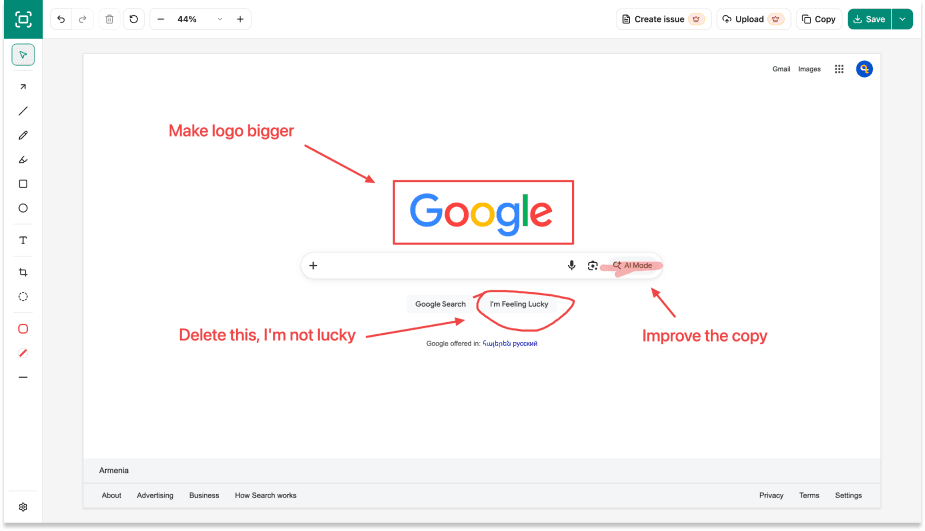
Screenshot Capture Studio preview editor with annotation toolbar and export actions.
Screenshot Capture Studio popup showing visible area, select area, and full page capture options.

Choose the capture that fits the page.

Start from the toolbar popup and keep the workflow focused on the active tab.

Visible area

Capture the current viewport when you need a quick screenshot of what is on screen.

Select area

Drag a region on the page and capture only the part you want to keep.

Full page

Scroll and stitch the active page locally before opening the result in the editor.

Edit before you export.

Every capture opens in a local preview editor with practical tools for comments, redaction, cropping, and export.

  • Annotate with arrows, text, rectangles, rounded rectangles, and ellipses.
  • Blur sensitive areas before saving or copying the image.
  • Zoom, crop, undo, reset, save PNG or JPEG, and copy the edited image.
Preview editor showing a captured page, annotation tools, zoom controls, and save/copy actions.
Settings page showing default capture action and export format options.

Simple defaults for repeated captures.

Set the default capture action used by Chrome shortcuts and choose the export format shown first in the preview editor.

Local-first by default.

Capture, editing, clipboard, and export processing happen locally in Chrome. The extension does not request broad host permissions and does not send screenshot pixels, page content, selected text, full page URLs, filenames, clipboard contents, or saved files to analytics.

Read the privacy policy